Custom WordPress Plugin Development Handbook
Introduction
Custom WordPress plugin development allows organizations to create functionality tailored specifically to their business requirements. While the WordPress ecosystem offers thousands of pre-built plugins, custom solutions can provide better performance, greater control, and seamless integration with existing systems.
When to Choose a Custom Plugin
A custom plugin is often the right choice when:
- Existing plugins do not fully support your business processes.
- Website performance is a high priority.
- Security and compliance requirements are strict.
- Integration with third-party systems is required.
- Long-term scalability and maintainability are important.
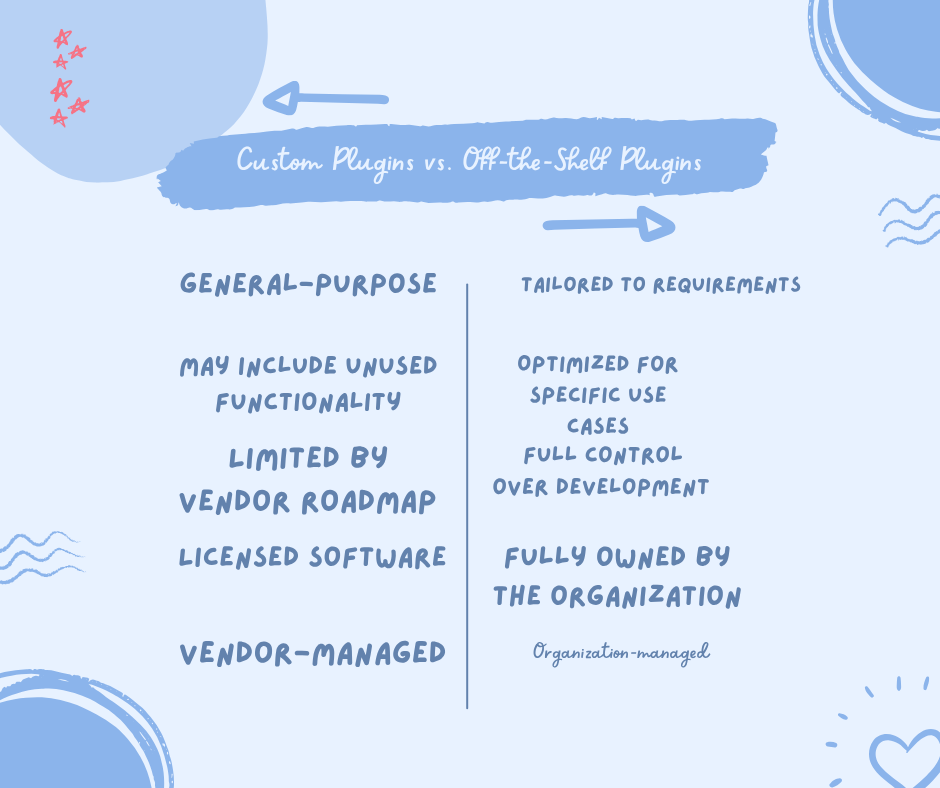
Custom Plugins vs. Off-the-Shelf Plugins
Development Process
1. Discovery and Planning
The first phase focuses on understanding business goals and defining project requirements.
Key activities include:
- Stakeholder interviews
- Feature prioritization
- User journey mapping
- Technical specification creation
- Wireframe and prototype development
2. Plugin Development
Development typically involves:
- Creating a structured plugin architecture
- Using WordPress APIs and coding standards
- Implementing actions and filters
- Building administrative interfaces
- Integrating external services when required
Technologies commonly used include:
- PHP
- JavaScript
- HTML/CSS
- WordPress Core APIs
- REST API integrations
3. Testing and Deployment
Before launch, plugins should undergo:
- Functional testing
- Compatibility testing
- Performance testing
- Security reviews
- User acceptance testing
Deployment should occur through staging environments before production release.
Security Considerations
Security should be a primary concern throughout development.
Recommended practices include:
- Input validation and sanitization
- Output escaping
- Secure authentication and authorization checks
- Regular code reviews
- Dependency management
- Ongoing maintenance and updates
Because custom plugins are not broadly distributed, they may be less exposed to automated attacks targeting widely used public plugins. However, they still require rigorous security practices.
WooCommerce Customization Opportunities
Custom plugins can significantly extend WooCommerce functionality through:
- Product configurators
- Dynamic pricing engines
- Guided selling experiences
- Advanced product filters
- Product comparison tools
- ERP and CRM integrations
- Inventory synchronization systems
These enhancements should be implemented using WooCommerce hooks and APIs rather than modifying core files.
Cost Considerations
Custom plugin development generally requires higher initial investment than purchasing an existing plugin. Costs vary based on:
- Feature complexity
- Integration requirements
- User interface design
- Security requirements
- Ongoing maintenance needs
Organizations should evaluate total long-term value rather than only initial development costs.
Best Practices
To maximize project success:
- Clearly define requirements before development begins.
- Follow WordPress coding standards.
- Build in staging environments.
- Prioritize security from the start.
- Document code and functionality thoroughly.
- Plan for future maintenance and updates.
- Use WordPress hooks and APIs whenever possible.
_ Conclusion
Custom WordPress plugins provide organizations with the flexibility to build functionality that precisely matches their business needs. Although development requires greater upfront investment, the benefits of performance optimization, scalability, ownership, and control can make custom solutions a valuable long-term investment.
Written by dev
Member of the Studio Engineering and Product Architecture practice.