WooCommerce Payment Gateway API Overview
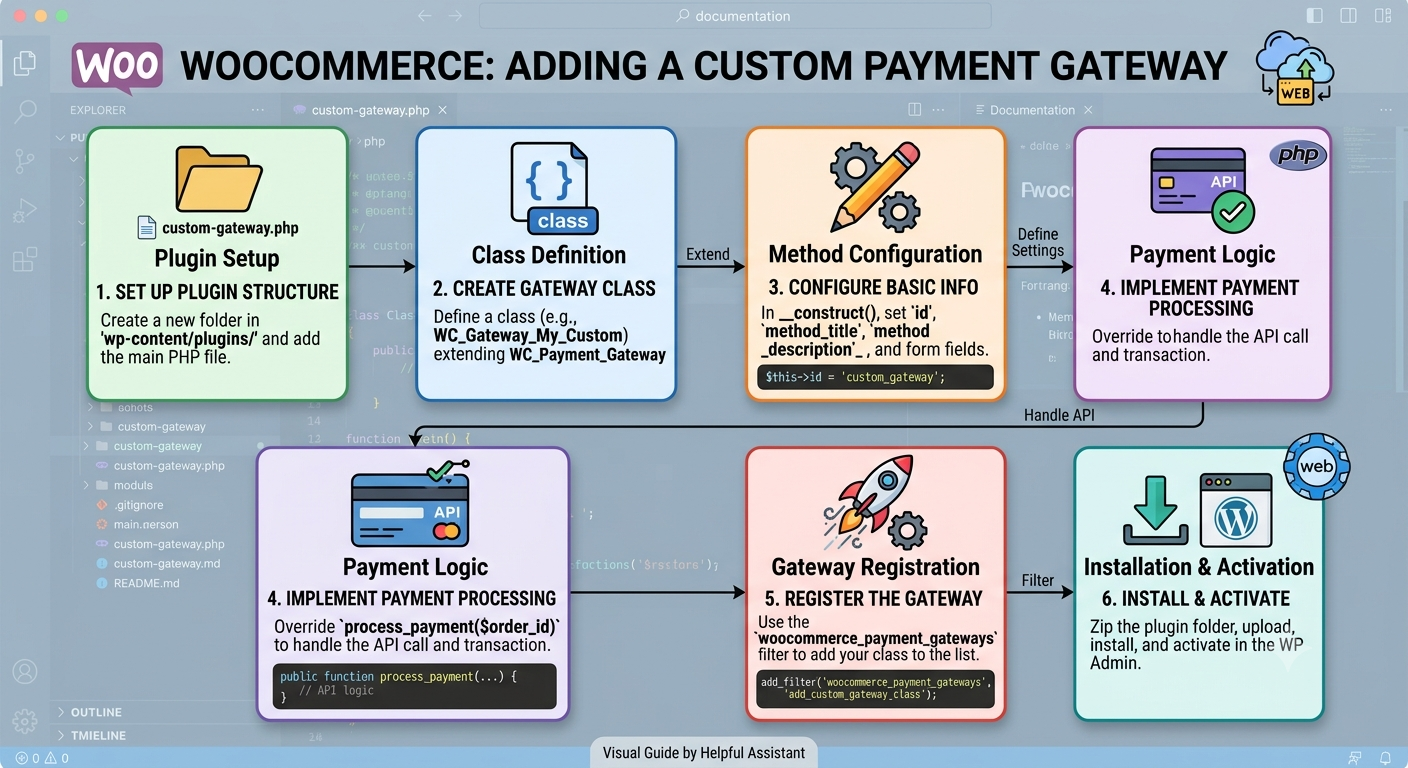
The WooCommerce Payment Gateway API enables developers to create custom payment gateways that integrate directly with WooCommerce stores. Payment gateways can support online card payments, redirects to external payment providers, embedded payment forms, or offline payment methods.
Gateway Types
WooCommerce supports several gateway implementations:
1. **Form-Based Gateways** – Redirect customers to a third-party payment page.
2. **iFrame Gateways** – Display payment forms within an embedded frame.
3. **Direct Gateways** – Collect payment details on the WooCommerce checkout page.
4. **Offline Gateways** – Methods such as bank transfer, cash on delivery, or cheque payments.
Creating a Payment Gateway
A payment gateway is implemented by creating a PHP class that extends the `WC_Payment_Gateway` class.
Typical plugin structure:
* Load the gateway class when WooCommerce is available.
* Register the gateway using the `woocommerce_payment_gateways` filter.
* Configure gateway settings.
* Process payments through the provider’s API.
* Handle callbacks or webhooks from the payment provider.
Essential Gateway Properties
The constructor typically defines:
* Gateway ID
* Display title
* Description
* Whether checkout fields are required
* Settings initialization
* Admin configuration handling
Example properties:
* `id`
* `method_title`
* `method_description`
* `has_fields`
Gateway Settings
The `init_form_fields()` method defines configurable options displayed in the WooCommerce admin panel.
Common settings include:
* Enable/Disable gateway
* Checkout title
* Description
* Test/Sandbox mode
* API credentials
* Webhook secrets
These settings are automatically managed through WooCommerce’s Settings API.
Payment Processing
The `process_payment()` method is responsible for:
1. Receiving the order.
2. Sending payment data to the payment provider.
3. Handling the response.
4. Returning success or failure results.
On successful payment:
* Mark the order as paid.
* Reduce stock if necessary.
* Redirect the customer to the order confirmation page.
On failure:
* Display an error message.
* Keep the order pending or failed.
Direct Payment Gateways
For gateways that collect payment information directly on the checkout page:
* Set `has_fields = true`.
* Implement `payment_fields()`.
* Implement `validate_fields()`.
These gateways require additional security measures, including SSL and compliance with payment industry requirements.
Webhooks and Callbacks
Most modern payment providers notify WooCommerce when payment status changes.
Webhook handlers should:
1. Verify the incoming request.
2. Locate the related order.
3. Confirm payment status.
4. Update the WooCommerce order accordingly.
5. Add order notes for auditing.
Recommended Payment Flow
1. Customer places an order.
2. WooCommerce creates the order record.
3. Gateway sends payment request to the provider.
4. Customer completes payment.
5. Provider sends a callback/webhook.
6. Gateway verifies the transaction.
7. Order is marked as paid.
8. Customer is redirected to the success page.
Best Practices
* Use WooCommerce order APIs instead of manually changing statuses.
* Validate all incoming data.
* Verify webhook signatures.
* Store API keys securely.
* Support sandbox and production environments.
* Add detailed order notes for troubleshooting.
* Log API requests and responses when debugging.
Conclusion
The WooCommerce Payment Gateway API provides a standardized framework for integrating payment providers with WooCommerce. By extending `WC_Payment_Gateway`, implementing payment processing logic, and handling webhooks securely, developers can create reliable and maintainable payment gateway plugins.
Written by dev
Member of the Studio Engineering and Product Architecture practice.